


CelerClean: Cleanup Tools
4.6161.00 Reviews
App Specs
- Version
- 1.0.0
- Updated On
- License
- Free
- Downloads
- 500,000+
- Developer
- Online Radio & Music Apps
- Categories
- Tools
- Platform
- Android
Screenshots
 Analysis by AppCompare
When storage starts running low, I find that the most useful first step is not a sweeping “speed up” button but a clear look at what is taking up space. That is the practical idea behind CelerClean: Cleanup Tools: it is a free tools app from Online Radio & Music Apps, aimed at helping you review storage, deal with large files, and keep installed apps more organized. Its strongest case is straightforward housekeeping, rather than turning routine phone maintenance into a technical project.
Making Storage Cleanup More Deliberate
I focus here on the part of CelerClean that seems most useful in everyday life: making storage cleanup a considered decision rather than a rushed attempt to free space. A good review starts with identifying what is taking up room, then weighing whether it is safe to remove. From there, I look at how that approach can fit into a practical cleanup routine.
Why finding large files matters
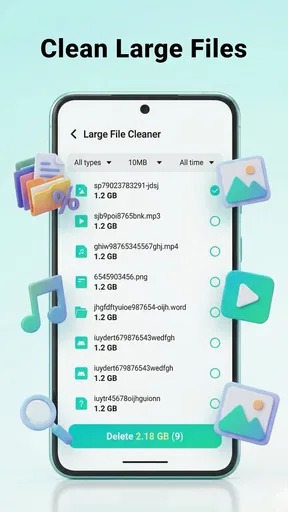
Storage pressure is often less mysterious than it feels. A few bulky items can be more responsible than dozens of tiny files, but it is easy to overlook them when browsing folders one at a time. A tool that brings storage management and large-file cleanup into one place can make that first inspection easier. I see the main benefit as helping you decide what deserves attention before you start deleting things.
That distinction matters: cleaning is not automatically useful just because an app offers a button for it. A large file may be important, while a smaller item may be disposable; the sensible workflow is to inspect, decide, and then act. I would treat CelerClean as a guide for organizing a cleanup session, not as permission to remove anything without checking it first.
How I would use it in practice
I would begin by checking the storage picture when the phone warns that space is tight, then focus on the largest items rather than trying to clear everything at once. Before removing a file, I would ask whether it is a copy, an old download, or something I still need offline. That small pause is especially useful for documents, recordings, and media saved for travel or work.
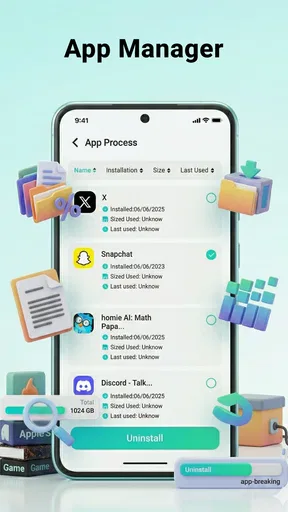
The app’s app-organization angle can also make a cleanup more considered. Instead of deleting an app solely because it looks unfamiliar, I would use a review session to identify apps I no longer recognize or use, then open each one’s details on the phone before deciding. This avoids a common mistake: removing an app that stores something locally or that I may need again.
A practical tip is to do the review when you have a few quiet minutes and a reliable backup for anything important. That way, you are not making rushed choices in a checkout line because a download will not fit. For a recurring routine, I would review storage after a trip, a large batch of downloads, or a period when I have been saving files for offline use—events that naturally create clutter without requiring a strict schedule.
Worth Reading Before You Choose

EA SPORTS FC Mobile 26 Is a Bigger Football Game, but It Takes Time

Flipboard Shows What News Apps Must Do Beyond the Feed

Switching to Android Auto Means Rethinking Your Driving Routine

Google Calendar Makes a Crowded Week Easier to Manage

Ludo King Makes the Most of the Minutes Between Plans

Baby Panda World Brings Quick Play to Modern Phones, but Its Game Library Feels Busy
A realistic low-storage day
Imagine you are about to leave home for the day and want to save a map, a few playlists, or a video, only to find there is not enough room. I would use CelerClean to locate the biggest candidates for review, then remove only items I can confidently replace or no longer need. I would leave personal records and files I cannot easily retrieve untouched, even if they take up more space.
That approach is less dramatic than a one-tap purge, but it is safer and usually more useful. If the space problem comes from a handful of old downloads, reviewing those can solve the immediate issue. If the phone is full because of a large collection you intentionally keep, cleanup software cannot make that trade-off disappear; you may need to move files elsewhere or choose what to keep.
Where it fits among storage tools
The usual alternatives are the phone’s built-in storage screen, a file manager, or a manual search through downloads and media folders. Built-in tools can be enough if you already know where the space is going, and a file manager gives confident users more direct control. CelerClean’s appeal is the more approachable cleanup workflow: it brings storage review, large-file cleanup, and app organization together as a maintenance task.
There is a trade-off. A dedicated cleaner can make the process feel simpler, but it should not replace the operating system’s own storage controls or your judgment about personal files. If you prefer to inspect folders yourself, or you only need to uninstall one app, the built-in settings may be quicker. I would choose this app when I want a guided pass over clutter, not when I need advanced file management or a guaranteed performance boost.
What to expect from a cleaner
Storage management and performance are related, but they are not the same thing. Removing unneeded files can make room for new downloads and reduce the frustration of a full device; it does not automatically make every phone faster. If sluggishness is caused by an older device, a demanding app, or a connection problem, deleting files may have little effect. I would judge the app by whether it helps me make sensible storage decisions, not by expecting it to fix every slowdown.
The same care applies to app organization. Removing something you do not use can simplify the device, but deleting an app may also remove locally saved content or sign you out of a service. Before uninstalling, I would check whether its files are backed up and whether I remember the login details. That is a small step, but it prevents a cleanup from becoming an avoidable recovery job.
Who benefits most—and who may not
I think CelerClean is best suited to people who regularly accumulate downloads, want a more guided way to inspect large files, or feel unsure where to begin when storage is nearly full. It may also suit someone helping a family member tidy a device, provided they review each deletion together rather than treating the app’s suggestions as automatic instructions.
It is less compelling for people who already keep their files carefully organized and are comfortable with the built-in storage manager. It is also not the right answer if your goal is a detailed archive workflow, cloud backup, or a forensic view of every folder; those needs call for tools designed specifically for those jobs. My rule would be simple: use a cleaner to find candidates, and use your own priorities to decide what stays.
Availability and everyday fit
The app is listed for Everyone, is free, and is currently at version 1.0.0, with a minimum OS requirement of 7.0. It has a 4.6 average from around 1.9 thousand ratings and more than 500 thousand installs, which suggests that plenty of people have tried it. I would still make my decision based on whether its cleanup approach fits my habits, since popularity does not tell me how carefully I will use a storage tool.
For a cautious first session, I would scan before removing anything, read file names and locations closely, and handle only items I can identify. I would also avoid doing a major cleanup when I am tired or in a hurry. Those habits are more valuable than trying to remove the maximum amount of data in one go, and they make any storage app safer to use.
My take on the cleanup approach
What I like about this kind of tool is the nudge toward a more organized review instead of leaving storage problems until the phone refuses a download. The most useful outcome is not an impressive-looking cleanup total; it is knowing which large files are expendable and which apps no longer belong on the device. That makes the app’s storage focus practical for ordinary maintenance.
My reservation is that a cleanup tool can encourage overconfidence if someone assumes every item it surfaces is junk. I would keep the process selective, especially with personal media and files that are difficult to replace. If you are comfortable making those calls, CelerClean can be a handy place to start; if you want a completely automatic solution, I would not rely on any cleaner to make those decisions for you.
Getting Started with CelerClean
First things first, downloading CelerClean: Cleanup Tools is a breeze. It’s available on both Android and iOS, so everyone’s invited to the cleanup party. Once you’ve installed it, you’re greeted with a clean, user-friendly interface that doesn’t require a PhD in computer science to navigate. Just the way I like it!
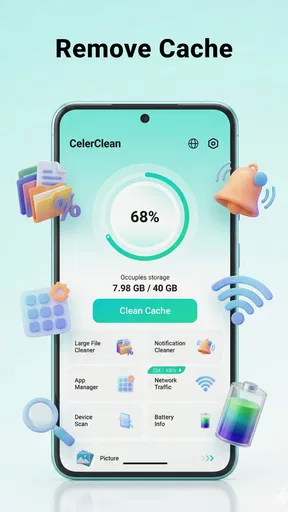
The app kicks off with a quick analysis of your phone’s storage. It’s like having a super-efficient friend who’s ready to point out all the junk you’ve been hoarding. Within seconds, you’ll see a breakdown of unnecessary files, cache, and those hidden apps you forgot you downloaded. It’s eye-opening!
Simplifying the Cleanup Process
Now, what I really appreciate about CelerClean is its simplicity. With just a tap, you can clear out cache files and residual junk. The app even offers a deeper cleaning option, which dives into your device’s nooks and crannies to get rid of those stubborn, lurking files. It’s like a digital detox for your phone.
And let’s talk about the RAM booster. If you’re like me and tend to multitask a bit too much, you’ll love this feature. It frees up memory, making your phone run smoother and faster. No more lagging during gaming sessions or when you’re trying to quickly switch between apps. Hallelujah!
Battery and Performance Optimization
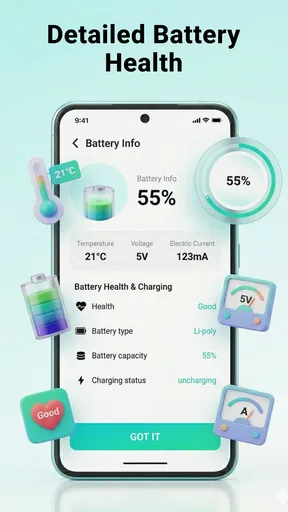
One of the standout features for me is the battery optimizer. CelerClean not only identifies apps that are draining your battery but also gives you the option to hibernate them. It’s like putting those energy-hogging apps in time-out until you need them. I’ve noticed a significant improvement in battery life, which is a game-changer for those long days out and about.
Plus, the app offers a CPU cooler feature. It monitors the temperature of your device and cools it down by closing apps that are causing it to overheat. If you’ve ever felt like your phone was doubling as a hand warmer, this feature is for you.
Security Features
But wait, there’s more! The app doesn’t just stop at cleaning. It adds an extra layer of security with its app lock feature. You can lock any app with a pattern or PIN, keeping your private data safe from prying eyes. It’s a nice bonus, especially if you’re handing your phone over to friends or family.
The app also includes a virus scanner to keep malware at bay. It’s like having a digital bodyguard ensuring your device stays healthy and threat-free.
Final Thoughts
In the world of cleanup apps, this tool stands out for its comprehensive feature set and ease of use. It’s a must-have for anyone looking to keep their phone in tip-top condition. Whether you’re dealing with sluggish performance, battery issues, or just need a good spring cleaning, it has got your back.
If you’re ready to give your phone a fresh start, download the app and watch as it works its magic. Trust me, your phone will thank you!
Pros
- User-friendly interface for easy navigation.
- Fast scanning and cleaning process.
- Effective junk file removal.
- Boosts device performance efficiently.
- Supports multiple languages.
Cons
- Contains in-app advertisements.
- Limited features in free version.
- Occasional false positives in scans.
- Requires constant updates for new features.
- Some tools need manual intervention.
FAQs for CelerClean: Cleanup Tools
What features does CelerClean: Cleanup Tools offer?
CelerClean provides a comprehensive suite of tools designed to optimize your device's performance. It includes features like junk file removal, memory booster, CPU cooler, and battery saver. Additionally, it offers app management and privacy protection, ensuring that your device runs smoothly and securely at all times.
Is CelerClean: Cleanup Tools safe to use on my device?
Yes, CelerClean is designed with user safety in mind. It uses advanced algorithms to carefully clean your device without affecting essential files. The app is regularly updated to include the latest security patches, ensuring your data remains private and your device remains protected.
How does CelerClean improve my device's performance?
CelerClean enhances your device’s performance by removing junk files and clearing cache, freeing up valuable storage space. It also optimizes RAM usage and manages background apps, which helps in reducing lag and improving speed. The CPU cooling feature prevents overheating, further boosting overall efficiency.
Does CelerClean: Cleanup Tools drain battery life?
No, CelerClean is designed to enhance battery life rather than drain it. It includes a battery saver feature that optimizes power usage by identifying and shutting down battery-draining apps running in the background. This helps extend the time between charges, ensuring longer usage periods.
Is CelerClean: Cleanup Tools available for both Android and iOS?
Currently, CelerClean is available for Android devices. The app is continuously being developed and improved, and an iOS version may be released in the future. Android users can download it from the Google Play Store, where it is regularly updated for optimal performance.


